I visited my local hardware store to get USB3 2.5″ HDD enclosure, being geek, I did my homework and decided to get noname enclosure for 15 EUR with semi rubber protection.
Good lady at the counter suggested that instead of 15EUR one, I get 13EUR noname enclosure since “it was better”.
Sceptical that I am, I bought both and decided to do a test and prove her that she is wrong. The one with higher price had to be better. :)
After fitting disks in enclosures, first issue I stumbled upon was a lack of disk benchmarking tool on MacOS. On Windows I used hdtune for ages and was happy with it. On MacOS however, Blackmagic Disk Speed Test in Mac App Store did not inspire confidence in me (blac kmagic, cmon?), not did 11yrs old Xbench or jDiskMark beta (written in Java).
In Ubuntu/Debian/RHEL land I’ve benchmarked device IO before and had good experience with FIO. FIO is a popular tool for measuring IOPS on a Linux servers.
Do not make mistake of benchmarking (or using dd for eg.) /dev/disk device.
On MacOS you should always use /dev/rdisk device.
/dev/disk – buffered access, for kernel filesystem calls, broken in 4kb chunks. goes more expensive root.
/dev/rdisk – “raw” in the BSD sense and force block-aligned I/O. Those devices are closer to the physical disk than the buffered cache ones.
If you do a read or write larger than one sector to /dev/rdisk, that request will be passed straight through. The lower layers may break it up (eg., USB breaks it up into 128KB pieces due to the maximum payload size in the USB protocol), but you generally can get bigger and more efficient I/Os. When streaming, like via dd, 128KB to 1MB are pretty good sizes to get near-optimal performance on current non-RAID hardware. (source)
1. Install FIO
brew install fio
2. Check correct disk number
diskutil list
Everything from this step forward can and will delete data on your disk. So BE VERY CAREFUL on which disk you use. You have been warned.
3. Precondition SSD
We precondition each drive the same way for each measurement, and stimulate the drive to the same performance state so the test process is deterministic
sudo dd if=/dev/zero of=/dev/rdisk2 bs=1m
4. Running tests
Random read/write performance
./fio --randrepeat=1 --ioengine=posixaio --direct=1 --gtod_reduce=1 --name=test --filename=test --bs=4k --iodepth=64 --size=4G --readwrite=randrw --rwmixread=75
Random read performance
./fio --randrepeat=1 --ioengine=posixaio --direct=1 --gtod_reduce=1 --name=test --filename=test --bs=4k --iodepth=64 --size=4G --readwrite=randread
Random write performance
./fio --randrepeat=1 --ioengine=posixaio --direct=1 --gtod_reduce=1 --name=test --filename=test --bs=4k --iodepth=64 --size=4G --readwrite=randwrite
(On MacOS we must use posixaio ioengine. If you are on running some different flavour of Unix just replace –ioengine=posixaio with eg. –ioengine=libaio for Ubuntu)
5. The results
The lady at the store was right! Using same HDD’s the cheaper HDD enclosure gave us better results. It was faster by almost 35%.
| tray | read mb/s | write mb/s | read IOPS | write IOPS | |
| ASMT (/dev/disk) | 10.9MiB/s | 11.9MiB/s | 86 IOPS | 94 IOPS | |
| ASMT | 69.7MiB/s | 72.8MiB/s | 552 IOPS | 576 IOPS | |
| PATRIOT | 92.4MiB/s | 93.5MiB/s | 738 IOPS | 747 IOPS |
If you are interested in values I got, here there are.
The first set of benchmarks (done on buffered /dev/disk device) revealed really poor performance [r=10.9MiB/s,w=11.9MiB/s][r=86,w=94 IOPS].
sudo fio --filename=/dev/disk2 --direct=1 --rw=randrw --rwmixwrite=50 --refill_buffers --norandommap --randrepeat=0 --ioengine=posixaio --bs=128k --rate_iops=1280 --iodepth=16 --numjobs=1 --time_based --runtime=86400 --group_reporting --name=benchtest
fio-2.18
Starting 1 thread
^Cbs: 1 (f=1), 0-2560 IOPS: [m(1)][0.5%][r=10.9MiB/s,w=11.9MiB/s][r=86,w=94 IOPS][eta 23h:52m:35s]
fio: terminating on signal 2
benchtest: (groupid=0, jobs=1): err= 0: pid=3075: Fri Mar 24 20:14:55 2017
read: IOPS=94, BW=11.8MiB/s (12.4MB/s)(5234MiB/445379msec)
slat (usec): min=0, max=303, avg= 0.40, stdev= 2.28
clat (msec): min=47, max=228, avg=100.40, stdev=14.81
lat (msec): min=47, max=228, avg=100.40, stdev=14.81
clat percentiles (msec):
| 1.00th=[ 74], 5.00th=[ 82], 10.00th=[ 85], 20.00th=[ 90],
| 30.00th=[ 93], 40.00th=[ 96], 50.00th=[ 98], 60.00th=[ 102],
| 70.00th=[ 105], 80.00th=[ 111], 90.00th=[ 119], 95.00th=[ 127],
| 99.00th=[ 151], 99.50th=[ 161], 99.90th=[ 184], 99.95th=[ 192],
| 99.99th=[ 208]
write: IOPS=94, BW=11.8MiB/s (12.4MB/s)(5237MiB/445379msec)
slat (usec): min=0, max=296, avg= 0.53, stdev= 2.81
clat (msec): min=25, max=177, avg=69.66, stdev= 9.52
lat (msec): min=25, max=177, avg=69.66, stdev= 9.52
clat percentiles (msec):
| 1.00th=[ 51], 5.00th=[ 58], 10.00th=[ 61], 20.00th=[ 63],
| 30.00th=[ 66], 40.00th=[ 68], 50.00th=[ 69], 60.00th=[ 71],
| 70.00th=[ 73], 80.00th=[ 76], 90.00th=[ 80], 95.00th=[ 86],
| 99.00th=[ 105], 99.50th=[ 114], 99.90th=[ 133], 99.95th=[ 137],
| 99.99th=[ 151]
lat (msec) : 50=0.44%, 100=76.81%, 250=22.76%
cpu : usr=0.46%, sys=0.41%, ctx=283619, majf=3, minf=6
IO depths : 1=0.1%, 2=0.1%, 4=0.1%, 8=50.0%, 16=50.0%, 32=0.0%, >=64=0.0%
submit : 0=0.0%, 4=100.0%, 8=0.0%, 16=0.0%, 32=0.0%, 64=0.0%, >=64=0.0%
complete : 0=0.0%, 4=98.3%, 8=1.7%, 16=0.1%, 32=0.0%, 64=0.0%, >=64=0.0%
issued rwt: total=41875,41894,0, short=0,0,0, dropped=0,0,0
latency : target=0, window=0, percentile=100.00%, depth=16
Run status group 0 (all jobs):
READ: bw=11.8MiB/s (12.4MB/s), 11.8MiB/s-11.8MiB/s (12.4MB/s-12.4MB/s), io=5234MiB (5489MB), run=445379-445379msec
WRITE: bw=11.8MiB/s (12.4MB/s), 11.8MiB/s-11.8MiB/s (12.4MB/s-12.4MB/s), io=5237MiB (5491MB), run=445379-445379msec
Repeated benchmark on same enclosure, but using raw device (/dev/rdisk) revealed much nicer numbers – 600% faster than buffered device
[m(1)][0.3%][r=69.7MiB/s,w=72.8MiB/s][r=552,w=576 IOPS][eta 23h:55m:54s]
sudo fio --filename=/dev/rdisk2 --direct=1 --rw=randrw --rwmixwrite=50 --refill_buffers --norandommap --randrepeat=0 --ioengine=posixaio --bs=128k --rate_iops=1280 --iodepth=16 --numjobs=1 --time_based --runtime=86400 --group_reporting --name=benchtest
fio-2.18
Starting 1 thread
^Cbs: 1 (f=1), 0-2560 IOPS: [m(1)][0.3%][r=69.7MiB/s,w=72.8MiB/s][r=552,w=576 IOPS][eta 23h:55m:54s]
fio: terminating on signal 2
benchtest: (groupid=0, jobs=1): err= 0: pid=3075: Fri Mar 24 21:13:39 2017
read: IOPS=538, BW=67.3MiB/s (70.6MB/s)(16.2GiB/245308msec)
slat (usec): min=0, max=47, avg= 0.45, stdev= 1.02
clat (msec): min=8, max=45, avg=15.05, stdev= 2.70
lat (msec): min=8, max=45, avg=15.05, stdev= 2.70
clat percentiles (usec):
| 1.00th=[11200], 5.00th=[12224], 10.00th=[12736], 20.00th=[13376],
| 30.00th=[13888], 40.00th=[14400], 50.00th=[14784], 60.00th=[15168],
| 70.00th=[15680], 80.00th=[16320], 90.00th=[17280], 95.00th=[18048],
| 99.00th=[23936], 99.50th=[36608], 99.90th=[39680], 99.95th=[40192],
| 99.99th=[42240]
write: IOPS=538, BW=67.4MiB/s (70.7MB/s)(16.2GiB/245308msec)
slat (usec): min=0, max=65, avg= 0.46, stdev= 0.67
clat (msec): min=6, max=45, avg=14.56, stdev= 2.71
lat (msec): min=6, max=45, avg=14.57, stdev= 2.71
clat percentiles (usec):
| 1.00th=[10560], 5.00th=[11712], 10.00th=[12224], 20.00th=[12864],
| 30.00th=[13376], 40.00th=[13888], 50.00th=[14272], 60.00th=[14784],
| 70.00th=[15168], 80.00th=[15808], 90.00th=[16768], 95.00th=[17536],
| 99.00th=[23680], 99.50th=[36096], 99.90th=[39168], 99.95th=[40192],
| 99.99th=[42240]
lat (msec) : 10=0.22%, 20=98.34%, 50=1.44%
cpu : usr=3.48%, sys=2.40%, ctx=531264, majf=3, minf=5
IO depths : 1=0.1%, 2=0.1%, 4=0.1%, 8=50.0%, 16=50.0%, 32=0.0%, >=64=0.0%
submit : 0=0.0%, 4=100.0%, 8=0.0%, 16=0.0%, 32=0.0%, 64=0.0%, >=64=0.0%
complete : 0=0.0%, 4=97.9%, 8=1.8%, 16=0.3%, 32=0.0%, 64=0.0%, >=64=0.0%
issued rwt: total=132027,132160,0, short=0,0,0, dropped=0,0,0
latency : target=0, window=0, percentile=100.00%, depth=16
Run status group 0 (all jobs):
READ: bw=67.3MiB/s (70.6MB/s), 67.3MiB/s-67.3MiB/s (70.6MB/s-70.6MB/s), io=16.2GiB (17.4GB), run=245308-245308msec
WRITE: bw=67.4MiB/s (70.7MB/s), 67.4MiB/s-67.4MiB/s (70.7MB/s-70.7MB/s), io=16.2GiB (17.4GB), run=245308-245308msec
Finally, the second HDD tray I benchmarked revealed best results, almost 35% faster than cheap-enclosure-1.
[m(1)][0.5%][r=92.4MiB/s,w=93.5MiB/s][r=738,w=747 IOPS][eta 23h:52m:50s]
sudo fio --filename=/dev/rdisk3 --direct=1 --rw=randrw --rwmixwrite=50 --refill_buffers --norandommap --randrepeat=0 --ioengine=posixaio --bs=128k --rate_iops=1280 --iodepth=16 --numjobs=1 --time_based --runtime=86400 --group_reporting --name=benchtest
fio-2.18
Starting 1 thread
^Cbs: 1 (f=1), 0-2560 IOPS: [m(1)][0.5%][r=92.4MiB/s,w=93.5MiB/s][r=738,w=747 IOPS][eta 23h:52m:50s]
fio: terminating on signal 2
benchtest: (groupid=0, jobs=1): err= 0: pid=3075: Fri Mar 24 20:37:26 2017
read: IOPS=761, BW=95.2MiB/s (99.8MB/s)(39.2GiB/430198msec)
slat (usec): min=0, max=310, avg= 0.55, stdev= 2.23
clat (msec): min=1, max=48, avg=11.43, stdev= 2.84
lat (msec): min=1, max=48, avg=11.43, stdev= 2.84
clat percentiles (usec):
| 1.00th=[ 6880], 5.00th=[ 8256], 10.00th=[ 8896], 20.00th=[ 9536],
| 30.00th=[10048], 40.00th=[10560], 50.00th=[11072], 60.00th=[11584],
| 70.00th=[12224], 80.00th=[12864], 90.00th=[14016], 95.00th=[15296],
| 99.00th=[22912], 99.50th=[28800], 99.90th=[35584], 99.95th=[37120],
| 99.99th=[40704]
write: IOPS=762, BW=95.3MiB/s (99.9MB/s)(40.3GiB/430198msec)
slat (usec): min=0, max=767, avg= 0.96, stdev= 3.58
clat (usec): min=492, max=45310, avg=9422.63, stdev=2869.71
lat (usec): min=493, max=45311, avg=9423.59, stdev=2869.68
clat percentiles (usec):
| 1.00th=[ 5024], 5.00th=[ 6240], 10.00th=[ 6944], 20.00th=[ 7712],
| 30.00th=[ 8256], 40.00th=[ 8640], 50.00th=[ 9024], 60.00th=[ 9536],
| 70.00th=[10048], 80.00th=[10688], 90.00th=[11712], 95.00th=[13120],
| 99.00th=[21888], 99.50th=[27264], 99.90th=[35072], 99.95th=[37120],
| 99.99th=[40704]
lat (usec) : 500=0.01%
lat (msec) : 2=0.01%, 4=0.08%, 10=49.48%, 20=49.08%, 50=1.35%
cpu : usr=4.59%, sys=2.86%, ctx=1256049, majf=0, minf=11
IO depths : 1=0.1%, 2=0.1%, 4=0.1%, 8=57.4%, 16=42.6%, 32=0.0%, >=64=0.0%
submit : 0=0.0%, 4=100.0%, 8=0.0%, 16=0.0%, 32=0.0%, 64=0.0%, >=64=0.0%
complete : 0=0.0%, 4=98.2%, 8=1.8%, 16=0.1%, 32=0.0%, 64=0.0%, >=64=0.0%
issued rwt: total=327551,327861,0, short=0,0,0, dropped=0,0,0
latency : target=0, window=0, percentile=100.00%, depth=16
Run status group 0 (all jobs):
READ: bw=95.2MiB/s (99.8MB/s), 95.2MiB/s-95.2MiB/s (99.8MB/s-99.8MB/s), io=39.2GiB (42.1GB), run=430198-430198msec
WRITE: bw=95.3MiB/s (99.9MB/s), 95.3MiB/s-95.3MiB/s (99.9MB/s-99.9MB/s), io=40.3GiB (42.1GB), run=430198-430198msec
Conclusion
fio is pretty robust utility for io testing. Beware of quality of onboard electronics when buying HDD trays. Trays within same price range, can vary 15-30% in speed.
EXPLAIN statement. So it came as a surprise that my highly optimized SQL query became so sloooow. After short investigation I discovered that MySQL optimizer changes the order in which tables are joined. In most cases the optimizer is right. In my case it was also right at the beginning of the project lifetime – but later it reordered them in suboptimal order.
By using STRAIGHT_JOIN instead of “regular” inner join I made my sql query optimized again:
STRAIGHT_JOINis an inner join where MySQL optimizer will not change the order of tables when joining them. It will always read the left table first and then the right table.
In general, you should put to the left the table which would give smaller result set in the final result.
Since premature optimization is the root of all evil, you should use “regular” inner join, monitor you application performance and check MySQL slow log. And if the sql query “suddenly” become slow – now you know how to fix it.
]]>My first thought was that improvements which were introduced in MySQL 5.7. regarding GET_LOCK() broke something.
Test script:
<?php
$host = 'DB_HOST';
$db = 'DB_NAME';
$user = 'DB_USER';
$pass = 'DB_PASSWD';
$charset = 'utf8mb4';
$dsn = "mysql:host=$host;dbname=$db;charset=$charset";
$opt = [
PDO::ATTR_ERRMODE => PDO::ERRMODE_EXCEPTION,
PDO::ATTR_DEFAULT_FETCH_MODE => PDO::FETCH_ASSOC,
PDO::ATTR_EMULATE_PREPARES => false,
PDO::ATTR_PERSISTENT => false
];
$pdo = new PDO($dsn, $user, $pass, $opt);
echo "<pre>";
echo "pid=(".getmypid().")\n";
$stmt = $pdo->query('SELECT GET_LOCK("foobar", 15)');
$row = $stmt->fetch();
var_dump($row);
echo "\n";
echo "Sleep for 50s\n";
sleep(50);
echo "</pre>";
?>
Lock timeout is 15s and script executes (and hold lock) for 50s so I could have time to start both scripts in parallel and monitor MySQL performance_schema.
Result from the first tab:
pid=(14769)
array(1) {
["GET_LOCK("foobar", 15)"]=>
int(1)
}
Sleep for 50s
Result from the second tab:
pid=(14769)
array(1) {
["GET_LOCK("foobar", 15)"]=>
int(1)
}
Sleep for 50s
Output is not as expected. GET_LOCK() from the second tab should return 0, not 1.
I executed the script again, but from the command line, again in parallel. Second one was executed 1-2s after the first one.
Result from the first (cmd line):
$ php -q locktest_1.php
<pre>pid=(16328)
array(1) {
["GET_LOCK("foobar", 15)"]=>
int(1)
}
Sleep for 50s
Result from the second (cmd line):
$ php -q locktest_1.php
<pre>pid=(16382)
array(1) {
["GET_LOCK("foobar", 15)"]=>
int(0)
}
Sleep for 50s
And everything was working as expected. First script obtained the lock, and second didn’t.
With helpful comments from StackOverflow community I continued with my investigation.
In order to see what is happening with my locks it is necessary to monitor performance_schema.threads and performance_schema.metadata_locks closely. To learn more about it check the MySQL documentation.
I added connection_id() in php test script in order to match running php script with entries in the performance_schema.threads and performance_schema.metadata_locks tables.
Now, armed with all this data, second round of test can begin.
After running the test scripts I quickly executed these sql queries:
select * from performance_schema.threads;
select * from performance_schema.metadata_locks;
You will see active threads and locks and their status (GRANTED, PENDING).
First one returned:
pid=(14773)
CONNECTION_ID()=(71)
array(1) {
["GET_LOCK("foobar", 15)"]=>
int(1)
}
Sleep for 50s
Second one returned:
pid=(14773)
CONNECTION_ID()=(72)
array(1) {
["GET_LOCK("foobar", 15)"]=>
int(1)
}
Sleep for 50s
Also in performance_schema.threads there was at any point in time only one entry related to the test script.
First it showed:
Please note row with PROCESSLIST_ID = 71 (matching the output from the first script)
I kept refreshing performance_schema.threads and noticed that one thread related to the test script was replaced with another one. They were not running in parallel like they do when I start test script from cmd line.
Please note row with PROCESSLIST_ID = 72 (matching the output from the second script)
Also performance_schema.metadata_locks showed only one lock at any point in time (not one GRANTED and one PENDING):
For example, when script was executed in parallel from cmd line performance_schema.metadata_locks showed:
For now, it seems that locking is in fact working correctly, but the scripts executed from two tabs of the same browser are not being executed in parallel.
I upgraded the test script to show start timestamp and end timestamp. This also proved that although I started the scripts with 1-2s delay, that they in fact were not running at the same time.
Final test script:
<?php
$host = 'DB_HOST';
$db = 'DB_NAME';
$user = 'DB_USER';
$pass = 'DB_PASSWD';
$charset = 'utf8mb4';
$dsn = "mysql:host=$host;dbname=$db;charset=$charset";
$opt = [
PDO::ATTR_ERRMODE => PDO::ERRMODE_EXCEPTION,
PDO::ATTR_DEFAULT_FETCH_MODE => PDO::FETCH_ASSOC,
PDO::ATTR_EMULATE_PREPARES => false,
PDO::ATTR_PERSISTENT => false
];
$pdo = new PDO($dsn, $user, $pass, $opt);
echo "<pre>";
echo "start timestamp=(".date("c").")\n";
echo "pid=(".getmypid().")\n";
$stmt = $pdo->query('SELECT CONNECTION_ID() as connid');
$row = $stmt->fetch();
echo "CONNECTION_ID()=(".$row['connid'].")\n";
$stmt = $pdo->query('SELECT GET_LOCK("foobar", 15)');
$row = $stmt->fetch();
var_dump($row);
echo "\n";
echo "Sleep for 50s\n";
sleep(50);
echo "end timestamp=(".date("c").")\n";
echo "</pre>";
?>
First one returned:
start timestamp=(2017-08-03T14:30:48+00:00)
pid=(14768)
CONNECTION_ID()=(73)
array(1) {
["GET_LOCK("foobar", 15)"]=>
int(1)
}
Sleep for 50s
end timestamp=(2017-08-03T14:31:38+00:00)
Second one returned:
start timestamp=(2017-08-03T14:31:38+00:00)
pid=(14768)
CONNECTION_ID()=(74)
array(1) {
["GET_LOCK("foobar", 15)"]=>
int(1)
}
Sleep for 50s
end timestamp=(2017-08-03T14:32:28+00:00)
Please note the end timestamp of the first and start timestamp of the second script.
Execution of the scripts was serialized. They definitely didn’t run in parallel and that was the reason why both succeeded to acquire the lock.
GET_LOCK() in MySQL 5.7 is still working as it should (plus the improvements). But even more important, I realized what a powerful tool Performance Schema is in debugging what at first appeared to be really weird bug.
]]>Recursion occurs when something uses a similar version of itself. Recursive procedure is one where at least one of its’ steps calls for a new instance of that very same procedure (broadly speaking we say that function calls itself). It is similar to iteration, with one major difference – iteration requires predefined number of repetitions, and with recursion one doesn’t need to know in advance how many repetitions there will be. In order to limit the number of repetitions and to avoid or stack overflow there must be a terminating scenario defined, so that the procedure can complete.
PHP limits the number of recursive calls and but it’s possible to expand this limit in php.ini file options.
http://php.net/manual/en/pcre.configuration.php
All recursive algorithms must have the following:
1. Base Case – end condition which is the solution to the “simplest” possible problem
2. Work toward Base Case – making the problem simpler
3. Recursive Call – using the same algorithm to solve a simpler instance of the problem
In order to show on a simple example how recursion works we will use the factorials. In mathematics, the factorial of a non-negative integer n, denoted by n!, is the product of all positive integers less than or equal to n. For example: 5! = 5 * 4 * 3 * 2 * 1 = 120. Let’s write two simple algorithms to calculate the factorial value of given integer.
The first example will use iterative approach:
$number = 5;
function iterativeFactorial($number)
{
if ($number < 0) {
return -1; //initial condition, if number is negative exit the program
}
else if ($number === 0) {
return 1; //factorial of 0 is 1
}
$factorial = 1;
if ($number <= 1) return $factorial;
while ($number > 1) {
$factorial *= $number;
$number--;
}
return $factorial;
}
The second example will use recursive approach:
$number = 5;
function recursiveFactorial($number)
{
if($number < 0) {
return -1; //initial condition, if number is negative exit the program
}
else if($number === 0) {
return 1; //base case to exit the recursion
} else {
return $number * recursiveFactorial($number-1); // recursive call
}
}
This phase is characterized by creating new instances of function calls and storing them on stack together with their addresses. In the first call the variable equals to 5 ($number = 5). It goes through initial condition – number must be positive in order to continue down the function. Then the base condition in which if number equals to zero the function will exit recursion. If this doesn’t happen ($number > 0), the function will call itself recursively to derive new instance of itself – 5 * recursiveFactorial( 5 – 1 ). The first instance of the function will wait on stack while the new instance repeats the process, this time $number variable will be equal to 5 – 1, which is 4 and it will compute 4 * recursiveFactorial (3). The process will continue until the $number variable is zero, in which case the function will return 1 and won’t call for the new instance of itself (base condition). At this point all created instances are waiting on stack, together with their return addresses.
The returning of 1 wakes up the last created instance of the function on stack (the one that called It – $number = 1), which accepts the return value of 1 and uses it to compute 1 * recursiveFactorial(1-1). This returns 1, the called instance is being deleted from stack and the next instance on stack is being called ($number = 2). After computing 2 * recursiveFactorial(2-1), 2 is returned, the called instance is being deleted from stack and next instance on stack is being called. The process continues until the “oldest” instance of function (the first one to be stored on stack, $number = 5) is computed and the final value of 120 returned.
Both functions were ran as php files from command line, using Ubuntu on my laptop. The $number variable was set to 150 and each function was ran 3 times. The results showed that on average recursive approach needed approximately 3.7 times more time than iterative.
The main disadvantage of recursive approach is that the algorithm may require large amounts of memory if the recursion goes very deep. This is because when the function is called, a new instance is created in memory. Also, it will most likely consume more time than iterative. Both disadvantages can be minimized with tail optimization which is not supported in PHP.
However there are pros to using recursive approach. It is more elegant and makes code more readable. Because of that it can reduce time needed to write and debug code. This approach is more suitable for solving specific problems, when problem can be broken down into smaller pieces (such as sorting algorithms).
The ultimate goal should always be to get as close as possible to achieving ‘low memory consumption and short execution time’. It’s up to a programmer to decide which approach works better for a specific problem in a specific development environment.
]]>Some resources were correct in their description but lacked the comprehensive examples, other were completely wrong or just very unclear.
In this article the same task will be implemented using only delegate, and then using both delegate and event. So the difference, relation between delegate and event and the advantage of using the event will be clear.
It is expected that reader of this article is familiar with basic C# and has some knowledge about delegates and events.
A delegate is a type that represents references to methods with a particular parameter list and return type. When you instantiate a delegate, you can associate its instance with any method with a compatible signature and return type. You can invoke (or call) the method through the delegate instance.
https://docs.microsoft.com/en-us/dotnet/csharp/programming-guide/delegates/
Please note that delegates can be chained – on single call multiple methods will be called.
Events enable a class or object to notify other classes or objects when something of interest occurs. The class that sends (or raises) the event is called the publisher and the classes that receive (or handle) the event are called subscribers.
https://docs.microsoft.com/en-us/dotnet/csharp/programming-guide/events/
We will create one lemming and three watchers that will monitor its health and respond as soon as health changes.
using System;
using System.Collections.Generic;
using System.Linq;
using System.Text;
using System.Threading.Tasks;
namespace delegate_only
{
public delegate void LemmingChanged(Lemming lemming);
public class Lemming
{
private int health;
public int Health
{
get { return health; }
set
{
health = value;
if (LemmingChanged != null)
{
LemmingChanged(this);
}
}
}
public LemmingChanged LemmingChanged;
}
class LemmingWatch
{
public void LemmingChangedHandler(Lemming lemming)
{
Console.WriteLine($"LemmingWatch lemming changed. Health=({lemming.Health})");
}
}
class AnotherLemmingWatch
{
public void LemmingChangedHandler(Lemming Lemming)
{
Console.WriteLine($"AnotherLemmingWatch Lemming changed. Health=({Lemming.Health})");
}
}
class YetAnotherLemmingWatch
{
public void LemmingChangedHandler(Lemming Lemming)
{
Console.WriteLine($"YetAnotherLemmingWatch Lemming changed. Health=({Lemming.Health})");
}
}
class Program
{
static void Main(string[] args)
{
Lemming Lemming = new Lemming() { Health = 99 };
LemmingWatch LemmingWatch = new LemmingWatch();
AnotherLemmingWatch anotherLemmingWatch = new AnotherLemmingWatch();
Lemming.LemmingChanged += LemmingWatch.LemmingChangedHandler;
Lemming.LemmingChanged += anotherLemmingWatch.LemmingChangedHandler;
Console.WriteLine("Change Health:");
Lemming.Health = 80;
Console.WriteLine("\n--\n");
// LemmingChanged not encapsulated
Console.WriteLine("LemmingChanged not encapsuled: Loose previous chained methods by mistake:");
YetAnotherLemmingWatch yetAnotherLemmingWatching = new YetAnotherLemmingWatch();
Lemming.LemmingChanged = yetAnotherLemmingWatching.LemmingChangedHandler; // loosing previous chained methods - mistake '=' instead of '+='
Console.WriteLine("Change Health:");
Lemming.Health = 51;
Console.ReadLine();
}
}
}
Change Health: LemmingWatch lemming changed. Health=(80) AnotherLemmingWatch Lemming changed. Health=(80) -- LemmingChanged not encapsuled: Loose previous chained methods by mistake: Change Health: YetAnotherLemmingWatch Lemming changed. Health=(51)
As you can see delegate is public – for now, this is necessary in order to enable adding event handler from outside of the class.
public LemmingChanged LemmingChanged;
Two event handlers are successfully added:
Lemming.LemmingChanged += LemmingWatch.LemmingChangedHandler; Lemming.LemmingChanged += anotherLemmingWatch.LemmingChangedHandler;
But there is mistake when adding the third one – and two previously added event handlers are removed by simple typing mistake (= instead of +=):
Lemming.LemmingChanged = yetAnotherLemmingWatching.LemmingChangedHandler;
Also since delegate is public – it is possible to evoke the event from the outside of the class and evoke event handlers although requirements for raising the event are not met.
using System;
using System.Collections.Generic;
using System.Linq;
using System.Text;
using System.Threading.Tasks;
namespace delegate_with_event
{
public delegate void LemmingChanged(Lemming lemming);
public class Lemming
{
private int health;
public int Health
{
get { return health; }
set
{
health = value;
if (lemmingChanged != null)
{
lemmingChanged(this); // use private delegate
}
}
}
private LemmingChanged lemmingChanged; // changed to private
// use event to add and remove event handler to/from delegate
public event LemmingChanged LemmingChanged
{
add
{
lemmingChanged += value;
}
remove
{
lemmingChanged -= value;
}
}
}
class LemmingWatch
{
public void LemmingChangedHandler(Lemming lemming)
{
Console.WriteLine($"LemmingWatch lemming changed. Health=({lemming.Health})");
}
}
class AnotherLemmingWatch
{
public void LemmingChangedHandler(Lemming Lemming)
{
Console.WriteLine($"AnotherLemmingWatch Lemming changed. Health=({Lemming.Health})");
}
}
class YetAnotherLemmingWatch
{
public void LemmingChangedHandler(Lemming Lemming)
{
Console.WriteLine($"YetAnotherLemmingWatch Lemming changed. Health=({Lemming.Health})");
}
}
class Program
{
static void Main(string[] args)
{
Lemming Lemming = new Lemming() { Health = 99 };
LemmingWatch LemmingWatch = new LemmingWatch();
AnotherLemmingWatch anotherLemmingWatch = new AnotherLemmingWatch();
Lemming.LemmingChanged += LemmingWatch.LemmingChangedHandler;
Lemming.LemmingChanged += anotherLemmingWatch.LemmingChangedHandler;
Console.WriteLine("Change Health:");
Lemming.Health = 80;
Console.WriteLine("\n--\n");
// LemmingChanged not encapsulated
Console.WriteLine("Add 3rd event handler:");
YetAnotherLemmingWatch yetAnotherLemmingWatching = new YetAnotherLemmingWatch();
// impossible to make mistake: C# error: event Lemming.LemmingChanged can only appear on the left hand side of += -=
//Lemming.LemmingChanged = yetAnotherLemmingWatching.LemmingChangedHandler;
Lemming.LemmingChanged += yetAnotherLemmingWatching.LemmingChangedHandler;
Console.WriteLine("Change Health:");
Lemming.Health = 51;
Console.ReadLine();
}
}
}
Change Health: LemmingWatch lemming changed. Health=(80) AnotherLemmingWatch Lemming changed. Health=(80) -- Add 3rd event handler: Change Health: LemmingWatch lemming changed. Health=(51) AnotherLemmingWatch Lemming changed. Health=(51) YetAnotherLemmingWatch Lemming changed. Health=(51)
Delegate is now private:
private LemmingChanged lemmingChanged;
Using event to add or remove event handler to or from delegate is very similar as using properties to get and set value to member variables.
Just instead of set/get, add/remove is used. :)
public event LemmingChanged LemmingChanged
{
add
{
lemmingChanged += value;
}
remove
{
lemmingChanged -= value;
}
}
Adding and removing the event handlers is done through event. It is not possible to access delegate directly from outside of the class.
And if we try to clear previously added event handlers by using = instead of += as in previous example – it is just not possible:
Lemming.LemmingChanged = yetAnotherLemmingWatching.LemmingChangedHandler;
C# will report error:
event Lemming.LemmingChanged can only appear on the left hand side of += -=
Events are heavily relay on delegates. In fact relationship between events and delegates is very similar as relationship between properties and member variables. Events provide safe and friendly way of using delegates.
They enable adding and removing event handlers from the outside of the class without allowing bad things to happen. Using events it is not possible to clear all event handlers by mistake or to raise the event from outside of the class (this is important because it is class responsibility to invoke the delegate when some class internal conditions are met).
By using events as a “wrapper” for delegate you encapsulation is not broken and you keep the needed flexibility. You can have you cake an eat it. :)

If you try to install Cisco VPN concentrator client (vpnc) today, chances are you won’t be able to since it was removed from regular homebrew formulae.
brew install vpnc Error: No available formula with the name "vpncc" ==> Searching for similarly named formulae... Error: No similarly named formulae found. ==> Searching taps... Error: No formulae found in taps.
However you can still install it from archive of homebrew formulae (boneyard):
brew cask install tuntap brew install homebrew/boneyard/vpnc
Be aware that this version of vpnc requires tuntap installed, also, it installs all this as dependencies:
brew deps vpnc gmp gnutls libffi libgcrypt libgpg-error libtasn1 libunistring nettle p11-kit
This will install last available, rather old vpnc version 0.5.3 dating back in 2006.
I found a new and modified version of vpnc on github modified for xnu (OS X 10.6+) and utun support so tuntap is not required. Unfortunately it is not yet in brew as formulae. However if you install all above dependencies, you will be able to build it easily your self:
git clone https://github.com/breiter/vpnc.git cd vpnc make sudo make install
This will install vpnc version 0.5.3-xnu-2015-07-03.
Both vpnc versions expect configuration to be present in
/usr/local/etc/vpnc]]>
HTTP Vary is not a trivial concept. It is by far the most misunderstood HTTP header. (Varnish Docs)
On a project I’ve been working, I could not make Varnish hard cache the site no matter what I did.
It was mostly read-only site and I wanted to achieve that in case of backend failures – site would still run from the cache. To avoid surprises, I was using my own configuration template which was working exactly as I wanted it on different project.
But, no matter what I did – Varnish was not caching everything. Instead I got ‘per-user‘ cache: if user visited eg, homepage, in case of backend failure – user could reload homepage and Varnish would serve homepage from stale cache to the user. Visiting any other page user did not visit before backend failure (and therefore not in his cache), would result in Varnish freaking that backend is down.
What I noticed was strangely large Vary-Header in Varnish response
Vary:Host,Accept-Encoding,User-Agent
After spending hours of tunneling, debugging Varnish configuration, analysing header responses, comparing server configurations, hunting for cookies that could have been somehow magically slip through… last place I looked was my main .htaccess. I was using mod_deflate there, but as it checked out everything was fine.
On a side note, I have been experimenting with per host configuration in .htaccess, so Basic Authentication would not kick in dev enviroment. It was working great up until now, and it goes something like this:
<if "%{HTTP_HOST} == 'dev.nivas.hr'">
Require valid-user
...
Allow from facebook.com
</if>
What I had to find out the hard way, is that if special Apache enviroment variable %{HTTP_HOST} was used in a eg. .htaccess, Apache would change response header. Server was returning a header which included a “Vary: Host” field, which means that the server didn’t serve a regular static page, but its reply depends on the “Host” field in the HTTP request. Browsers interpret this as “the content returned is dynamic, don’t cache it (source).
curl -I http://localhost/ HTTP/1.1 200 OK Date: Mon, 13 Feb 2017 14:48:14 GMT Server: Apache/2.4.6 (CentOS) Vary: Host,User-Agent Content-Type: text/html; charset=UTF-8
It is really strange I did not hit this before because RewriteCond can add “Host” to the Vary-Header as well. eg. a RewriteCond that evaluates %{HTTP_HOST} automatically adds “Host” to the Vary-Header. This is unnecessary and not permitted according to https://tools.ietf.org/html/rfc7231#section-7.1.4. The issue was reported and has been sitting in Apache bugtraq for a while without clear resolution.
I can understand why Varnish is not caching, but cannot understand Apache logic. I do have VirtualHost defined, so therefore my request do vary on Host. There is no need in forcing this out in response.
After removing %{HTTP_HOST} from .htaccess, site was cacheable as we wanted.
HTTP/1.1 200 OK Date: Mon, 13 Feb 2017 22:18:33 GMT Content-Type: text/html; charset=UTF-8 Vary: Accept-Encoding Age: 3707 X-Nivas-Crew: loves you :) https://www.nivas.hr X-Backend: backend_app1 X-Cache: HIT X-Cache-Hits: 786332 X-Vudu-Url-Cache: hit
Don’t forget to normalize your Vary in Varnish, chance are without normalization it will never see a cache hit.
Happy caching!
Although fb is pretty clear on how to do it (http://bit.ly/2eGfFDv) – many developers are still doing it wrong. So this blog post is here to be reminder for me and others, also it will propose small upgrade to the fb recommended practice.
<script src="//ajax.googleapis.com/ajax/libs/jquery/2.0.0/jquery.min.js"></script>
<script>
window.fbAsyncInit = function()
{
FB.init({
appId : 'your-app-id',
xfbml : true,
version : 'v2.8'
});
// do something with DOM and jQuery
$('#loginbutton,#feedbutton').removeAttr('disabled');
FB.getLoginStatus(updateStatusCallback);
};
(function(d, s, id){
var js, fjs = d.getElementsByTagName(s)[0];
if (d.getElementById(id)) {return;}
js = d.createElement(s); js.id = id;
js.src = "//connect.facebook.net/en_US/sdk.js";
fjs.parentNode.insertBefore(js, fjs);
}(document, 'script', 'facebook-jssdk'));
</script>
The problem with this is the race condition: at the time fbAsyncInit gets called there is no guaranty that DOM is ready and that #loginbutton or #feedbutton is there, ready to be used.
This bug is hard to spot and debug – since it will not always manifest. It is very likely that you as developer with fast connection and computer will never experience this bug – but your clients (visitors) might.

So it is best not to leave this to chance since fix is so easy.
Learn more: http://bit.ly/2eGfFDv
<script src="//ajax.googleapis.com/ajax/libs/jquery/2.0.0/jquery.min.js"></script>
<script>
$(document).ready(function()
{
$.ajaxSetup({ cache: true });
$.getScript('//connect.facebook.net/en_US/sdk.js',
function()
{
FB.init({
appId: '{your-app-id}',
version: 'v2.8'
}
);
$('#loginbutton,#feedbutton').removeAttr('disabled');
FB.getLoginStatus(updateStatusCallback);
});
});
</script>
Problem with this approach is that you are changing global jQuery ajax cache settings.
<script src="//ajax.googleapis.com/ajax/libs/jquery/2.0.0/jquery.min.js"></script>
<script>
$(document).ready(function()
{
$.ajax(
{
url: '//connect.facebook.net/en_US/sdk.js',
dataType: 'script',
cache: true,
success:function(script, textStatus, jqXHR)
{
FB.init(
{
appId : '{your-app-id}',
xfbml : true,
version : 'v2.8'
}
);
$('#loginbutton,#feedbutton').removeAttr('disabled');
FB.getLoginStatus(updateStatusCallback);
}
});
});
</script>
Now we did it. No race condition between jQuery, fb SDK for JS and loading of DOM. Also global jQuery Ajax settings are untouched.
Cheers! :)
]]>I was quite amused by the empty mysterious input field. :)
But, being the web developer for a decade (at least) – I knew what needs to be done:
Dear Crazy Egg users – get down on your knees and take a look upwards, and voila:
Mystery solved.
Also we tested this screen on several monitors, with slightly different points of view (we are diverse company in which developers range in height from 167 to 198cm) – in all cases content of the input field is not visible or at best barely visible.
So, do you want to share best UX fails you encountered?
]]>The specified path, file name, or both are too long. The fully qualified file name must be less than 260 characters, and the directory name must be less than 248 characters
Yes, Windows can’t delete this directory because of the limitations in system. What now? Don’t worry, NPM comes to the rescue.
Just install Node package rimraf.
> npm install rimraf -g
Move to direcotry above node_modules and execute.
> rimraf node_modules
Tell me how it goes :)
]]>
Some time last week Google Chrome browser on all workstations (Win7 x64) I use got their preference files corrupted and as a result I lost all my bookmarks, extensions etc.
Internet paranoid as I am, first thing for me was to scan for viruses, and luckily did not find any (just some friendly AdWare my beloved Lenovo has preinstalled for me but that’s another post). Just in case – I uninstalled Chrome and cleaned up registry using ccleaner before I do a clean install. One restart later, I was heading to google.com with my ol’trusty Internet Explorer in order to download and run Chrome installer.
What happened next was beyond everything I was prepared for – Google Chrome was unable to install throwing a undescriptive message: “Installation failed. The Google Chrome installer failed to start.“. Tried everything. Restarting, cleaning left over Chrome stuff manually from disk and registry, downloading and running alternate (offline) Google Chrome installer. No luck. Each time this irritating graphics slammed me:

The funny lol moment was reached when I googled for manual chrome uninstall:

First result, on Google support forum https://support.google.com/chrome/answer/111899?hl=en results in a – Page not available. *FACEPALM*
After hours of wasting my time googling I started considering a Windows re-install.
But at the end, digging through registry paid off. Found additional ‘special’ key which nobody mentioned nowhere for x64 os (Wow6432Node). After deleting it, I was finally able to reinstall Chrome.
First thing I did after I reinstalled it – I run ccleaner and – corrupted Chrome settings. Luckily I could repeat uninstall/reinstall procedure knowing what I was forced to learn. :)
Hope it will help somebody.
Solution
To fix “Chrome installer failed to start” issue, you have to manually delete Chrome uninstaller left overs:
1. Delete “%APPDATA%\Google” folder and all of it’s contents
2. Delete following registry keys:
HKEY_LOCAL_MACHINE\SOFTWARE \Google\
HKEY_CURRENT_USER\SOFTWARE \Google\
And the most important – for 64-bit Windows, delete also
HKEY_LOCAL_MACHINE\SOFTWARE\Wow6432Node\Google\
3. If you by any chance use ccleaner or any similar utility for deleting your browser/system cache, and you update your browsers regularly – be 100% sure to always update the cleaning apps to newest versions to avoid corruption of your browsers configuration.
]]>See you there!
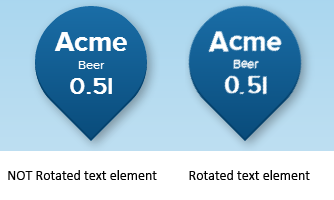
]]>That works nicely, we can have box shadows, and background diagonal gradients, it looks nice, but for the problems in chrome, which renders fonts poorly? There is no one rule solution for this problem, the solution is not to rotate text element, chrome can’t handle it.
Workaround for this problem is to have two separate elements standing one on top of the other, so one can be rotated (gradient/droplet) and text element must not have transform rotate on it.

But when making flags or some similar extra graphical feathers, pseudo class element seems to have larger z-index then his parent element, which defeats the purpose, so this is how you make it better :)
#parent {
position: relative;
width: 200px;
height: 200px;
z-index: 1;
background-color: blue;
margin-left:35%;
}
#pseudo-parent {
position: absolute;
}
#pseudo-parent:after {
content: "";
width: 100px;
height: 100px;
display: block;
position: absolute;
z-index: -1;
background-color: red;
top:0;
left:-25px;
}
]]>AddOutputFilterByType DEFLATE text/html text/css application/x-javascript
If you upgraded from Apache 2.2 to 2.4, you will notice error in your apache log:
Invalid command ‘AddOutputFilterByType’, perhaps misspelled or defined by a module not included in the server configuration.
To fix this, enable mod_filter and restart Apache. mod_filter is required in 2.4, although in 2.2 was not the case.
]]>From php changelog:
2012-01-03 : security / trunk - Added php-5.2-max-input-vars patch max_input_vars directive to prevent attacks based on hash collisions - CVE-2011-4885
Why we have so much form fields is a subject for different post. The main problem is that even php site says this update is available from PHP version 5.3.9. The fact is we have 5.3.2-1ubuntu4.14 and the update is there.
So… you know… beware. :)
]]>
From early 60s to modern times, spreadsheet processors play important role in every man’s day life which basic functionality is taken for granted.
In the accounting a “spread sheet” was and is a large sheet of paper with columns and rows that lays everything out about transactions for a business person to examine. An electronic spreadsheet organizes information into columns and rows. The data can then be “added up” by a formula to give a total or sum. The spreadsheet program summarizes information from many sources in one place and presents the information.
If you are wondering who are those two cool spreadsheet hipsters, check out A Brief History of Spreadsheets (here and here). Now, let’s go back to 2012. Erm 2007.
Did your Excel (2007) stopped auto calculating your precious formulas out of the sudden and you are in a hurry to send cost estimates to your client? Just like mine did? Yes, that can be nasty. :)
Simple eh? How did this switch off in first place? No idea. This applies to Excel 2007, dunno about 2012:

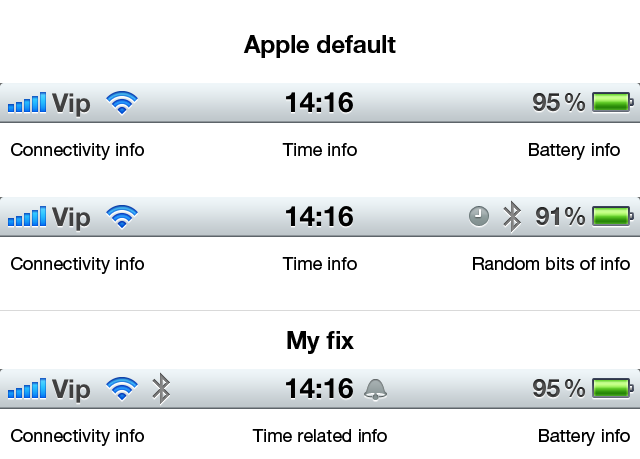
If we segment the top bar into three pieces (left, central, right) each of which has a particular info to convey, the structure is pretty clean. On the left there is info about connectivity, signal strength, wireless, 3G etc. Middle part is reserved for time, and on the right there is battery info.
The problem starts when additional icons show up, in particular Alarm and Bluetooth. The Bluetooth icon is an obvious candidate to be moved on the left side since all the connectivity is there. There is no reason to dislocate Bluetooth to the right.
Alarm icon has two problems.
First, an icon itself. Clock. Clock is a wrong communication on many levels. I can clearly remember few years ago when I first got iPhone that this icon meant nothing to me. I set the Alarm and had no idea a Clock icon means that I have an alarm setup. Throughout user interfaces of the world alarm was mostly represented by a ringing bell. This not only is a better visual communication but also is a logical translation of the ancient real-life alarms (church bells) into digital era.
Second problem is the position. When a clock icon appears next to battery icon, what does that mean? It means nothing, exactly. Alarm icon must be placed next to time, because they are both time related bits of information.
Additional Hate
While doing this I found out this little bit of not-so-perfect design. Three icons, each of them has different shade of grayish color. How did Steve miss that one out? Also, minute-hand is not centered. My OCD is kicking in now, I have to stop dissecting these icons.

I wrote a simple regexp to strip few characters (pipe, minus, apostrof and white-space) that are added before the actual item.
function cleanOptionText(txt)
{
return txt.replace(/^[\s|'-]+/, '');
};
It worked just fine on FF9 and Chrome but in IE8 only the first pipe (|) was removed. After some debugging I discovered that I have both spaces and non-breaking spaces that should be removed and that in IE8 class shorthand \s (which should include all white space) doesn’t include non-breaking space.
Code for non-breaking space is 0xa0 (dec 160) so regexp should be updated as follows:
function cleanOptionText(txt)
{
return txt.replace(/^[\s\xA0|'-]+/, '');
};
Also we took opportunity to update our javascript trim functions:
String.prototype.trim = function()
{
return this.replace(/^[\s\xA0]+|[\s\xA0]+$/g,"");
}
String.prototype.ltrim = function()
{
return this.replace(/^[\s\xA0]+/g,"");
}
String.prototype.rtrim = function()
{
return this.replace(/[\s\xA0]+$/g,"");
}
Here is complete html test file:
<!DOCTYPE html PUBLIC "-//W3C//DTD XHTML 1.0 Strict//EN" "http://www.w3.org/TR/xhtml1/DTD/xhtml1-strict.dtd">
<html xmlns="http://www.w3.org/1999/xhtml">
<head>
<title>nbsp test</title>
</head>
<body>
<form action="#">
<fieldset>
<select id="testselect">
<option value="1"> Some option</option>
</select>
</fieldset>
</form>
<script type="text/javascript">
/*<![CDATA[*/
var txt=document.getElementById('testselect').options[0].text;
var analyizeTxt='';
var l=txt.length;
for(var i=0; i<l; i++)
{
analyizeTxt+= '[ ('+txt.charCodeAt(i)+')=('+txt.charAt(i)+')]';
}
alert(analyizeTxt);
var newTxt1 = txt.replace(/^\s+/, '');
alert('Using only \\s = ('+newTxt1+')');
var newTxt2 = txt.replace(/^[\s\xA0]+/, '');
alert('Using \\s and \\xA0= ('+newTxt2+')');
/*]]>*/
</script>
</body>
</html>
]]>Ante explained: “Ubuntu Cloud is a product. Ubuntu Live Cloud is a custom version of Ubuntu Cloud, customized to work without a disk. OpenStack is a major, if not essential, part of the Ubuntu Cloud.”
]]>