

Category:
developers journal
FireFox 3 Release candidate 3 – rendering still screwed up
Related to the post i made some time ago, while Beta 5 was popular, the newly released RC3 is still blurring small icons. New rendering engine is just not good in dealing with small stuff.
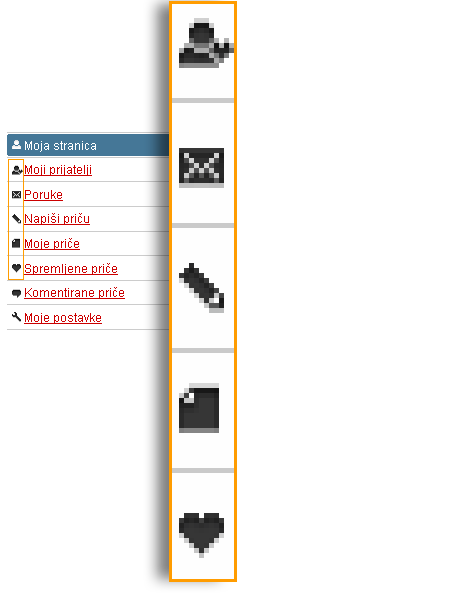
Is it can be fix tiem now plees?
Because if this stays in the official release, we are all doomed.

7 thoughts on “FireFox 3 Release candidate 3 – rendering still screwed up”
June 13, 2008 at 21:43
I think it’s a transparency issue. I can tell those famfamfam icons you are using here are blurred.
I’ve tried a non-transparent image and it stayed sharp.
June 15, 2008 at 21:59
Negative dude, you might notice that the icons i used in the example (the really big picture about 500 pixels above this text) are just dark icons, not FamFamFam icons. They are supposed to be pixel-sharp but they are blurred in new FireFox.
June 16, 2008 at 02:29
I can’t figure out how nobody else in the WORLD haven’t reported similar problem.
Only link google popped out was this from google – Writely is Broken. And guys haven’t even pinpointed a browser to cause a problem.
June 16, 2008 at 09:29
Oh yea, just tested the Google Docs in FF3 and icons are blurred hard core.
More examples will start circulating the web after 17.06. when people download Firefox 3.
June 18, 2008 at 05:54
Here’s one example. Gaiaonline.com. Runs on a backbone of customizable pixel-perfect avatars, but when they upscale in the editing page they’re now getting blurred, making those pixel-perfect modifications much harder to judge. All of the tiny little icons representing icons are also getting blurred when displayed, as they are innately meant to be on some pages, at a larger size.
At the very least if a setting for this could be added to the about:config page it would be much appreciated. Or if the Cairo rendering effects were simply stopped until the page was actively zoomed/scaled it would be a real boon to those of us who want our images rendered pixel-perfect.
June 20, 2008 at 12:10
KJones, the problem is not in Zooming, as you can turn off image scaling in Zoom mode ( View > Zoom > Zoom text only ). The problem is that images are blurry as well at 100%.
September 7, 2008 at 18:23
А это Вы написали на основе личного опыта?